.png)

Bulk voice calls for election campaign communication work best for short, approved, factual audio messages, such as an event reminder or helpline announcement, delivered in a clear regional-language voice. Plan the script, the call flow, the calling hours and the pause process before you load a list, and check whether the recording needs election-specific certification.
Teams considering bulk voice calls for election campaigns usually ask about reach. The better questions are about quality and control: is the script approved, is the audio clear, are the call hours sensible, and who can stop the campaign? This guide covers planning and quality checks for voice campaigns, from script to report. It is part of our wider guide to political campaign marketing in India, and it sits beside our comparison of SMS and voice calls for election campaigns.
By Rupali Dahiwal. Last reviewed: 25 October 2026. This is operational guidance, not legal advice. It does not provide persuasion scripts. Rules vary by election and call type, so confirm the current position before you schedule.
What a bulk voice campaign is
A bulk voice campaign plays a recorded message, or text read aloud by text-to-speech, to many phone numbers in one campaign. SMSNiti's bulk voice call service describes recipients being able to press a key to reply, calls being retried when unanswered, call reports showing who answered, how long they listened and which key they pressed, and support for both mobile and landline numbers. It also states that calls are made from registered numbers in the series allowed for the call type, and that promotional calls follow consent and DND rules.
That is a recorded or automated call, not a conversation with a person. Be clear about the difference in your plan and in what you tell recipients. A call centre team calling voters is a different operation with different controls and is not what this guide covers.
Step 1: Confirm what rules apply to the call
Voice calls fall under the telecom framework as well as any election-specific direction. Check three things before you plan content:
Telecom rules for the call type. TRAI's page on unsolicited commercial communication treats voice calls and SMS alike, mentions automated and prerecorded calls, and states that commercial calls or messages from 10-digit numbers are not allowed. TRAI's page also says communications from registered senders follow different rules. Ask your telecom provider how your specific campaign call is classified. See TRAI's page on UCC and its advice to senders.
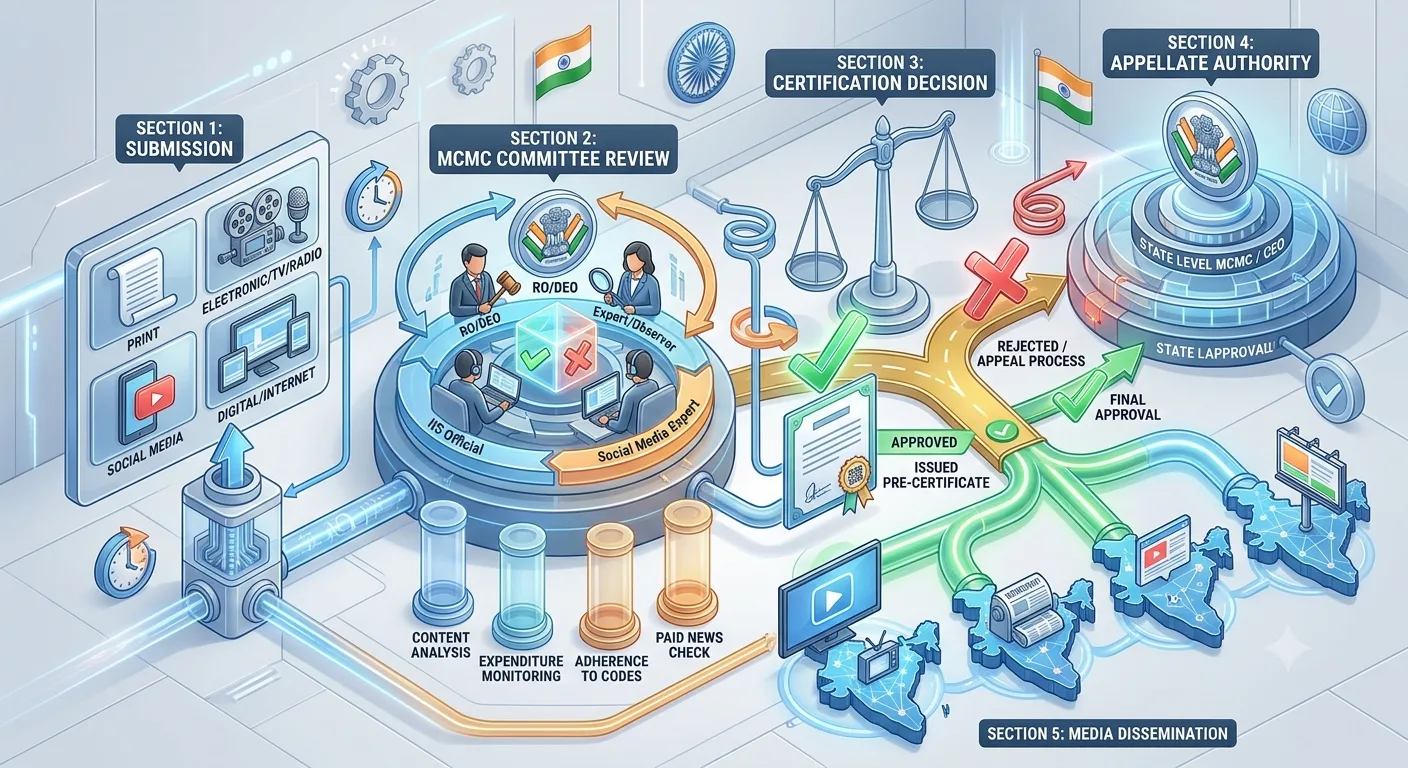
Election-specific approval. For the elections covered by its press note dated 20 March 2026, the Election Commission required political advertisements on electronic media, including bulk SMS and voice messages, to be pre-certified by the Media Certification and Monitoring Committee (MCMC). Whether a voice recording counts as a political advertisement is a question for the MCMC or a qualified adviser. Our guide to MCMC pre-certification explains how to verify it.
Timing rules. SMSNiti's voice service lists a campaign panel window of 10 AM to 9 PM, and notes that promotional calls must also stay within legally permitted hours. Election periods can add restrictions, so confirm them against the official order for your election.
Step 2: Write the script for listening, not reading
Voice is heard once, in order, and often while the listener is busy. A script that reads well on a page can fail aloud. Use these rules:
Say who is calling in the first sentence. Name the sender and the reason.
One purpose per call. A reminder is not the place for three announcements.
Short sentences. Avoid clauses that make the listener wait for the verb.
Repeat the key detail once. Say the date, time or number, then repeat it near the end.
Say numbers slowly, in the way listeners expect them, in groups for phone numbers.
Keep it short. Time the script by reading it aloud at a natural pace.
Keep performance notes, such as pace and tone, separate from the words that will be spoken, so the approved script is a clean document. For more on voice campaign design, see our guide on planning a bulk voice campaign with a clear recipient outcome.
A neutral sample structure (illustrative)
This is an illustration, not an approved script. It is neutral and uses placeholders.
"This is a message from [sender name]."
"The [event name] on [date] now begins at [time] at [venue]."
"For questions, call [helpline number] between [hours]."
"Once more: [event name], [date], [time], [venue]."
Step 3: Choose recorded audio or text-to-speech
SMSNiti's voice service supports uploading a recorded voice message or typing text for text-to-speech. A recording is the same for every recipient, while text-to-speech can read personal details such as names. For campaign notices, a recording by a clear human speaker is often easier to approve and check, because the exact audio can be reviewed once. Text-to-speech can mispronounce names and place names, so use it with care and listen to the full output before approval.
If you use a recording, our guide to briefing a voice recording for a regional election communication covers speaker choice, pronunciation and audio quality in detail.
Step 4: Map the call flow
Even a short call has a flow. Write it down:
Answered, listened to the end: what happens next, if anything?
Answered, hung up early: is this recorded? Do not read it as interest.
Key pressed: what does each key do, and who follows up?
Invalid key or no key: does the call repeat once, or end?
Not answered: will the system retry? How many times? Retries must follow your approved plan and provider rules, not an assumption.
Keep key options plain. One or two choices are easier than a menu. Never add a key option for which nobody is ready to follow up.
Step 5: Prepare the list
Know where each number came from and what permission exists for this use.
Apply suppression for anyone who asked not to be contacted.
Remove duplicates and invalid numbers.
Limit access to the file.
Do not choose recipients by religion, caste or inferred political views. Use operational selections, such as district or an event registration. If recipients did not expect to hear from the sender, expect complaints. The calls reflect on whoever is named in the first sentence.
Step 6: Test the whole call
Before any large batch, run a complete test with authorised recipients on real phones:
Is the audio clear on a basic handset and on a speaker?
Is the sender identified at the start?
Are names, places and numbers pronounced correctly?
Does each key option do what the script says?
Does the call end properly?
Do the call reports show what you expect?
Ask a tester to explain in their own words why they got the call. If they cannot, the opening needs work. If anything changes after the test, test again.
Step 7: Schedule and release carefully
Pick call windows when recipients are likely to be able to listen, within allowed hours.
Do not place repeated calls to the same person beyond what your approved plan states.
Have a named person who authorises the release and a named person who can pause it.
Keep the final audio file, the transcript and any approval record together.
Step 8: Read the report honestly
A call report tells you what the system recorded: who answered, how long they listened and which key they pressed. It does not tell you whether anyone agreed with the message, changed a view or voted differently. Separate these:
Attempted: calls placed.
Answered: calls picked up.
Listened: calls that played to a stated point, as defined by the provider.
Responded: key presses captured.
Issues: complaints, wrong versions, corrections.
Use the provider's own definitions of each status, and do not quote benchmark answer rates you cannot support with your own logs.
Quality checklist
Rules checked: telecom, election-specific and timing.
Script approved, with facts verified.
Audio reviewed by a native speaker.
Call flow mapped, including no-answer and invalid input.
List source and permissions confirmed, suppression applied.
Full test completed on real phones.
Release owner and pause owner named.
Report definitions agreed in advance.
Common mistakes
Treating an automated call like a person. Be clear what it is.
Not identifying the sender first. Recipients hang up.
Skipping the full test. A wrong name, spoken aloud, reaches everyone.
Assuming retries are fine. They need to be in the approved plan.
Adding key options with no follow-up. Do not invite a response you will ignore.
Judging success by calls placed. Attempts are not outcomes.
Frequently asked questions
Can campaigns use bulk voice calls during elections?
It depends on the election, the content and the call type. Telecom rules apply, and the Election Commission named bulk voice messages within the media requiring pre-certification of political advertisements for the elections covered by its 20 March 2026 note. Check the orders for your election and ask your telecom provider how your call is classified.
What is the difference between recorded calls and text-to-speech?
A recording plays the same audio to everyone. Text-to-speech reads typed text aloud and can include names or amounts. Listen to either before approval.
What calling hours apply?
SMSNiti's voice service lists a campaign panel window of 10 AM to 9 PM and says promotional calls must stay within legally permitted hours. Confirm the position for your election and call type.
Can I retry calls that were not answered?
SMSNiti's voice service describes auto retry for unanswered calls, but retries should follow your approved plan and provider rules, not an assumption.
Does a call report show if a message persuaded anyone?
No. It shows call status, listening time and key presses. It cannot show opinion or voting behaviour.
Sources checked
Election Commission of India, Press Note No. ECI/PN/038/2026 dated 20 March 2026. Checked 24 October 2026.
TRAI, What is spam or UCC, last updated 23 October 2026 as shown on the page. Checked 25 October 2026.
TRAI, Advice to Senders / Telemarketers, last updated 23 October 2026 as shown on the page. Checked 24 October 2026.
SMSNiti bulk voice call service page, for the features, hours and report fields described. Checked 25 October 2026.
If you are planning a voice campaign, SMSNiti can walk you through setup, testing and reports. Bring your draft script, your list source and your approval status.