.png)
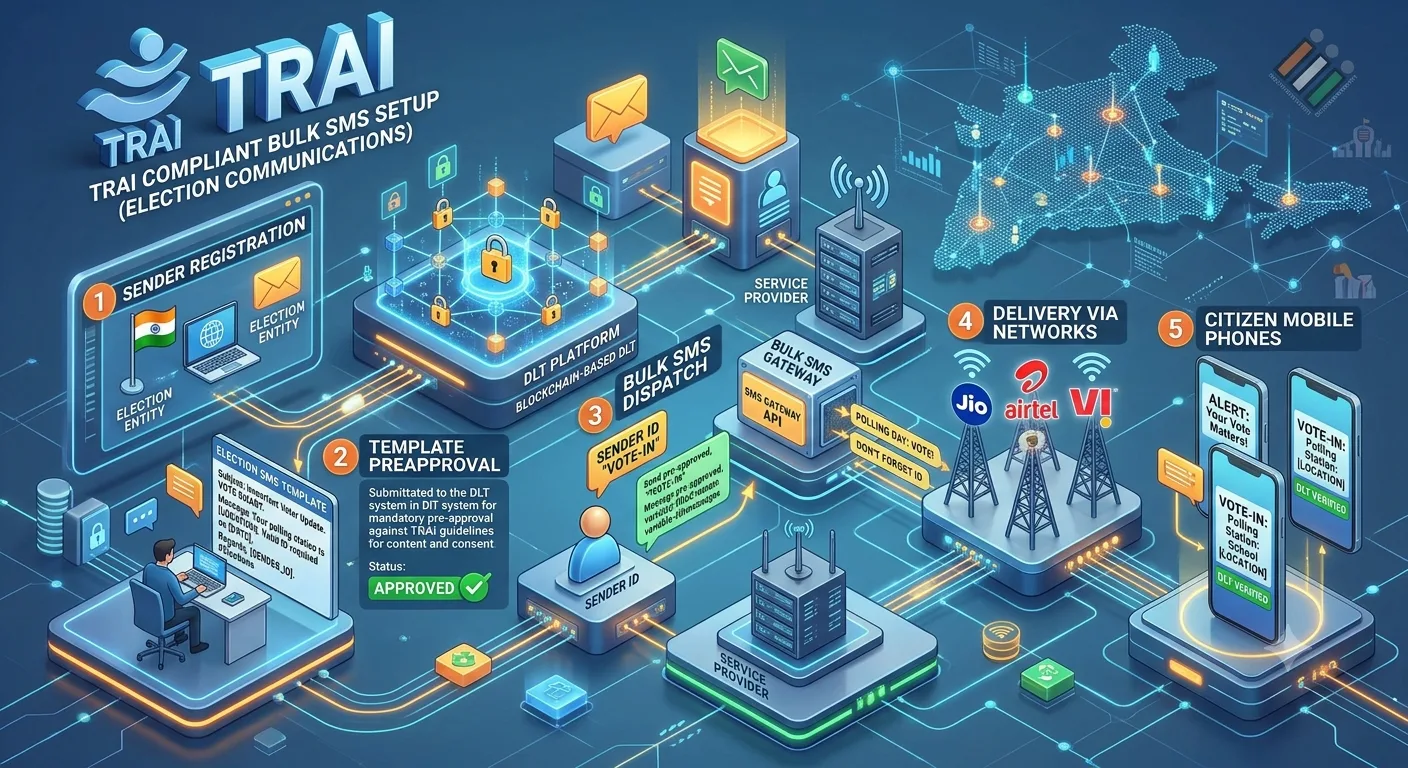
For TRAI DLT election campaign SMS, the telecom setup is the same sequence TRAI lists for commercial senders: register as a Principal Entity, register a header, register content templates, pass your identifiers to the telecom operators, and collect consent through a registered consent template where applicable. DLT setup is not election approval, and the two should never be treated as one.
Many campaign teams ask whether their TRAI DLT election campaign SMS setup is "done" once a template is approved. The honest answer is that DLT setup answers only one question: are you a registered sender with a registered template? This guide turns the official sender steps into a set of questions to settle before launch, and explains how they differ from election-specific approval. It supports our wider guide to political campaign marketing in India.
By Rupali Dahiwal. Last reviewed: 24 October 2026. This is operational guidance, not legal advice. Some political communications may be classified in specific ways, so ask your telecom provider and a qualified adviser about your exact case.
What TRAI says senders must do
TRAI's page of advice to senders lists the steps for sending commercial communications. In summary:
Register as a Principal Entity (PE). Businesses, legal entities and government bodies that send bulk messages register through the telecom service provider's process.
Register a header. Commercial messages use a registered header, an alphanumeric sender name. TRAI's page gives examples such as VD-KOTAKB and JD-IPAYTM.
Register content templates. Messages sent through a registered header follow a registered template with fixed and variable parts.
Pass identifiers to the telecom service providers. When you submit messages for delivery, you provide your PE ID, header and Content ID.
Register a consent template and collect consent, where applicable. Consent is collected through a registered consent template before commercial messages are sent.
TRAI's page states: "Failing to follow any steps will not allow you to send CC." See TRAI's advice to senders for the current text. The page also describes message categories. Promotional messages are those sent without the recipient's explicit consent, and service messages are sent with consent or through a registered template to facilitate or confirm a transaction the recipient previously agreed to, or to provide safety or security information. Which category fits an election-related message is a question for your telecom provider.
Who approves what
This is the most misunderstood part of the process. In a press note dated 8 September 2025, TRAI said it has no role in accepting or rejecting individual SMS campaigns and that approval or rejection of SMS message templates is carried out by the telecom service providers under the framework of TCCCPR 2018. In practice:
Your telecom provider's DLT process approves or rejects your entity, header and templates.
TRAI sets the framework. It does not approve individual campaigns.
The Election Commission and its MCMCs handle election-specific approval of political advertisements, where it applies.
Your SMS provider helps you prepare and submit, but cannot approve anything on anyone's behalf.
That last point matters when you evaluate vendors. A provider that promises template approval is promising something it does not control. Our vendor scorecard includes questions on this.
Telecom setup is not election approval
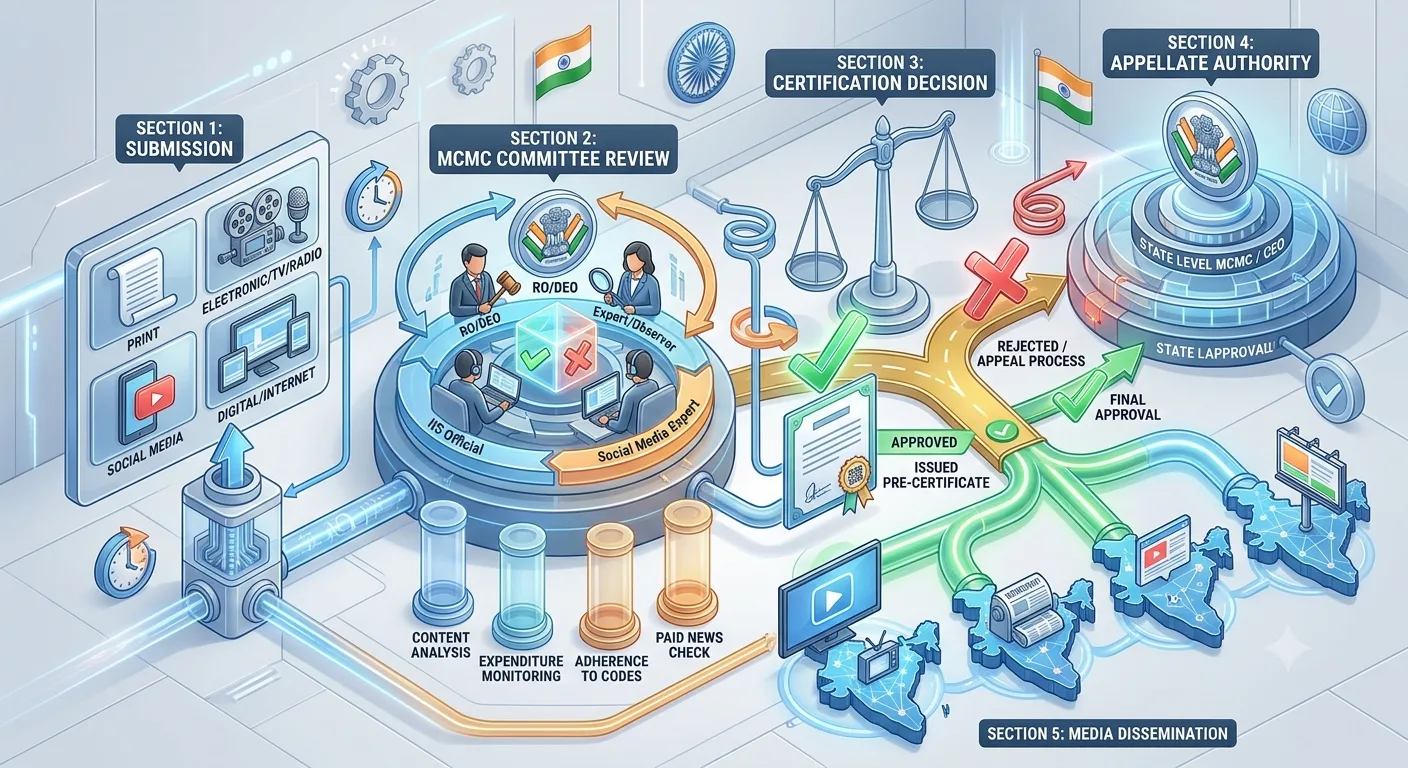
For the elections covered by its press note dated 20 March 2026, the Election Commission required political advertisements on electronic media, including bulk SMS and voice messages, to be pre-certified by the Media Certification and Monitoring Committee before publication. That is an election-specific approval of the content. DLT setup does not replace it, and certification does not replace DLT setup. Where both apply, you need both. Our guide to MCMC pre-certification explains how to verify the second one.
Telecom setup (TRAI and DLT)
What it answers: is the sender registered, and is the template registered?
Who decides: telecom service providers, under the TCCCPR framework.
What is approved: entity, header, template, links and numbers.
When it applies: commercial SMS, generally.
Does it replace the other? No.
Election approval (ECI and MCMC)
What it answers: is this political content cleared for publication?
Who decides: the relevant MCMC, with appeal to the state-level committee.
What is approved: the content of the advertisement.
When it applies: for the elections covered by the relevant orders.
Does it replace the other? No.
Questions to resolve before launch
1. Who is the sending entity?
The registered Principal Entity must match the real sender. Decide whether it is a party unit, a candidate's office or an agency, and make sure the documents match. SMSNiti's DLT page lists typical documents such as business proof, PAN, an authorisation letter for the person registering and address proof, and notes that requirements vary by operator and entity type.
2. Which header will recipients see?
The header is the sender name on the phone. Choose one that clearly identifies the sender and matches the entity. Brand names may be checked against the business.
3. Which template category fits each message?
Templates are registered by category, and the category determines who can receive them. Ask your telecom provider how election-related messages should be categorised, and do not choose a category only because it is easier to get approved. A mismatch between category and real purpose can cause rejection or later problems.
4. Is every fixed word final?
An approved template cannot be edited. Any change means a new submission. Lock the wording, including any election-specific certification, before submitting.
5. Which links and call-back numbers will appear?
If your messages include a link or a phone number, check whether it must be registered and register it before you submit templates that use it. Test every link on a phone.
6. Is consent required, and where is it recorded?
TRAI's guidance refers to consent collected through a registered consent template where applicable. Work out whether consent applies to your messages, and keep a record of the basis for each list. If you cannot show where a list came from, do not use it.
7. How will the provider connect to your registration?
Your entity, header and templates must be linked to the provider you send through. Confirm who does this and how you can verify it.
8. What if a template is rejected?
Ask who sees the reason, how quickly a revision can be submitted and how many attempts you can plan for. Leave extra time in your calendar. Do not plan a send for the day after submission.
9. Who holds the records?
Keep copies of your entity ID, header, template IDs and approval dates. They help when you troubleshoot and when you hand over to another team.
A sensible order of work
Confirm which election and channel you are planning for.
Check election-specific requirements and note timelines.
Collect your registration documents.
Register the entity and header.
Finalise message wording, then submit templates.
Register any links and numbers your templates use.
Connect your provider and run a test send.
Release with a named owner, and keep the records.
For the day-of-send detail, our bulk SMS setup and delivery checklist picks up from here. If you prefer help with the registration steps, SMSNiti's DLT registration guide describes the process in six steps, and notes that the time taken depends on how fast the operator verifies documents and approves templates.
Common mistakes
Assuming DLT approval clears the content for the election. It does not.
Submitting templates before the wording is final. Changes need new submissions.
Leaving it late. Operators decide approval, and timing is outside your control.
Using the wrong category. It can lead to rejection and to later trouble.
Ignoring links and numbers. Unregistered items can cause failures.
Relying on a vendor's promise. No vendor can promise approval.
Frequently asked questions
Is DLT registration mandatory for election SMS?
TRAI's guidance for senders says that failing to follow the listed steps will not allow you to send commercial communications. Whether a particular election message is classified as commercial communication is a question for your telecom provider. Ask before you plan the send.
Does TRAI approve political SMS campaigns?
No. In a press note dated 8 September 2025, TRAI said it has no role in accepting or rejecting individual SMS campaigns, and that template approval is carried out by telecom service providers under the TCCCPR 2018 framework.
What is a header in SMS?
It is the alphanumeric sender name that recipients see, and it must be registered. TRAI's page gives examples such as VD-KOTAKB.
Do I need MCMC certification as well as DLT approval?
For the elections covered by the ECI note of 20 March 2026, political advertisements on electronic media including bulk SMS needed pre-certification. For other elections, check the relevant orders. DLT approval does not replace it.
Can I change a template after approval?
No. A change needs a new template submission.
How long does DLT registration take?
There is no fixed duration. It depends on how fast the operator verifies documents and approves templates, so start early.
Sources checked
TRAI, Advice to Senders / Telemarketers, last updated 23 October 2026 as shown on the page. Checked 24 October 2026.
TRAI, Information Note to the Press dated 8 September 2025, "Clarification on Media Reports regarding rejection of SMS Campaigns". Checked 24 October 2026.
Election Commission of India, Press Note No. ECI/PN/038/2026 dated 20 March 2026. Checked 24 October 2026.
SMSNiti, DLT registration page, for the registration steps and documents described. Checked 24 October 2026.
TRAI's rules and operator processes are updated from time to time, so re-check the current text before each campaign. Take the questions above to your telecom provider and your SMS provider, and ask for the answers in writing.